To get speech or sound from Veo 3.1, switch With Audio on and put the exact line in quotation marks, or label a voiceover and list the sounds you want. Below are 11 real gallery prompts whose videos have a sound track, and 3 that came out silent.
Key takeaways
Sound is a paid setting. An 8-second Fast clip at 1080p is 6 credits silent and 10 with sound.
Dialogue that works: describe the speaker, then one short sentence in quotation marks. About 20 words fit naturally in 8 seconds.
Label narration as “Voiceover” or “Narration” so the model doesn’t give the words to someone on screen.
Say what you don’t want: “no music”, “no spoken dialogue”, “no subtitles”.
Every voice and sound example here is real; our two templates are clearly marked.
Switch on With Audio and try a line of dialogue
The generator shows the credit cost for your current settings before you generate; toggle With Audio to compare.
Sign in with Google to create an account; buy credits only when you need them.
What sound costs
Credits for one 8-second clip, silent and with sound, from our current price list:
Model and resolution
Silent
With sound
Veo 3.1 Lite, 720p
2 credits (about $0.43–$0.50)
3 credits (about $0.64–$0.75)
Veo 3.1 Lite, 1080p
3 credits (about $0.64–$0.75)
5 credits (about $1.07–$1.25)
Veo 3.1 Fast, 1080p
6 credits (about $1.28–$1.50)
10 credits (about $2.13–$2.50)
Veo 3.1 (Quality), 1080p
13 credits (about $2.77–$3.25)
26 credits (about $5.55–$6.49)
The generator’s own note on the With Audio switch says audio is experimental and some videos may not include sound. Check the first take before you generate a batch. If you plan to add music and voiceover in the edit anyway, leave sound off and save the credits.
Three sound prompts, taken apart
One prompt, two models
The same cartographer prompt was run on Fast at 1080p (10 credits (about $2.13–$2.50)) and on Lite at 720p (3 credits (about $0.64–$0.75)). Both files have a sound track.
Prompt text
What it does
“A medium shot, historical adventure setting”
Shot size first, then genre. A medium shot keeps the face large enough to read the lips.
“Warm lamplight illuminates a cartographer in a cluttered study, poring over an ancient, sprawling map”
Who, where and what they’re doing before they speak. It doesn’t say age or gender: Fast gave an older man, Lite a woman.
“Cartographer: "According to this old sea chart, the lost island isn't myth! We must prepare an expedition immediately!"”
Speaker label, colon, the line in quotes. 17 words, which fits in 8 seconds.
“"action": "Shot A: creator tosses a walnut into the air and catches it in her mouth, medium shot, smiling. Shot B: …"”
The picture, split into two named shots.
“"dialogue_voiceover": "I can snack without feeling guilty, and they taste amazing."”
Ten words of voiceover in its own field, so you can rewrite the line without touching the picture.
“"sound_design": "Background music runs continuously"”
Music asked for separately from the voice.
“"text_overlay": { … "wording": "I can snack without feeling guilty
and they taste amazing" }”
Asks the model to draw a caption. Generated text is unreliable, so check it or add captions in the edit.
“"duration_seconds": 2”
Ignored: the clip is 4 seconds because that’s what the Duration control was set to.
Dialogue and voiceover prompts
Spoken lines, narration and voiceover, including prompts in Spanish, Turkish and Hindi and one English voiceover with Arabic headings. Translations are ours.
A cartographer’s line, on Fast at 1080p
Veo 3.1 Fast · 16:9 · 1080p · 8 s · audio on
Cost for this exact setting today: 10 credits (about $2.13–$2.50) (dollar range depends on your plan or pack)
A medium shot, historical adventure setting: Warm lamplight illuminates a cartographer in a cluttered study, poring over an ancient, sprawling map spread across a large table. Cartographer: "According to this old sea chart, the lost island isn't myth! We must prepare an expedition immediately!"
Why it works: This is the simplest dialogue pattern that works: set the scene, then write Speaker: “line”. The line is short enough to fit in 8 seconds. Our frame grabs show an older man leaning over the map in a lamplit study.
The same prompt on Lite at 720p
Veo 3.1 Lite · 16:9 · 720p · 8 s · audio on
Cost for this exact setting today: 3 credits (about $0.64–$0.75) (dollar range depends on your plan or pack)
A medium shot, historical adventure setting: Warm lamplight illuminates a cartographer in a cluttered study, poring over an ancient, sprawling map spread across a large table. Cartographer: "According to this old sea chart, the lost island isn't myth! We must prepare an expedition immediately!"
Why it works: This is the identical prompt on the cheapest setting with sound. It says “a cartographer” without age or gender. Fast gave us an older man and Lite gave us a woman, so if the speaker matters, describe them.
A mouse and a cat at the fridge
Veo 3.1 Fast · 9:16 · 1080p · 8 s · audio on
Cost for this exact setting today: 10 credits (about $2.13–$2.50) (dollar range depends on your plan or pack)
The mouse trembles.
Mouse: "Yesterday... my best friend disappeared inside."
The blue cat smiles nervously.
The darkness inside the fridge starts moving.
Why it works: Four short sentences: an action, a line with a pause written as “...”, a reaction, and a closing beat. Our frame grabs show the mouse facing the blue-grey cat, then dark shapes spilling out of the fridge.
Voiceover in a British accent (coffee ad)
Veo 3.1 Fast · 9:16 · 1080p · 8 s · audio on
Cost for this exact setting today: 10 credits (about $2.13–$2.50) (dollar range depends on your plan or pack)
Prompt (verbatim, English voiceover with Arabic section headings)
التعليق الصوتي (Voiceover - بلكنة بريطانية):


"Another grey morning? You grab a regular coffee to wake up, but it just leaves you feeling jittery and anxious before the day even starts. It’s time for a change, mate."

برومبت توليد الفيديو (Video Prompt):


Cinematic, photorealistic video. An average British man in his early 30s standing in a typical, cozy UK kitchen on a cloudy, grey morning. He wears a casual knitted jumper. He is holding a standard coffee mug, looking groggy and slightly anxious, gently rubbing his temples to show morning stress and caffeine jitters. Soft natural lighting from the window, highly detailed, 4k resolution, smooth slow motion
Our translation: The two Arabic headings mean “Voiceover (in a British accent)” and “Video generation prompt”; each already has its English label in brackets.
Why it works: The voiceover comes first under its own label, and the picture is described separately. That separation tells the model the words are narration, not something the man on screen says.
Watch out: The narration is 31 words. Natural speech fits roughly 20 words into 8 seconds, so a script this long risks being rushed or cut off. One sentence is safer.
One spoken line, no scene description (Spanish)
Veo 3.1 Fast · 16:9 · 1080p · 8 s · audio on
Cost for this exact setting today: 10 credits (about $2.13–$2.50) (dollar range depends on your plan or pack)
¿Por qué al hombre le encanta tanto el zapato deportivo en cuero? Porque se siente cómodo todo el día, y porque un cuero bueno dura años, no meses."
Our translation: “Why do men love leather sneakers so much? Because they’re comfortable all day, and because good leather lasts years, not months.”
Why it works: This shows what dialogue alone gets you: the model has to invent the speaker, the setting and the shot. It’s a quick way to hear a line read, but for an ad you would add who says it and where.
Documentary narration in Turkish
Veo 3.1 Fast · 16:9 · 1080p · 8 s · audio on
Cost for this exact setting today: 10 credits (about $2.13–$2.50) (dollar range depends on your plan or pack)
8-second cinematic documentary video.

A dark mysterious archive office at night, dark academia style, wooden desk, old clocks, hourglasses, dusty historical documents, antique maps, candlelight and one weak desk lamp. On the desk there is an old calendar from 1582. The room feels abandoned, silent and historical. Dust particles float in the light. The camera slowly pushes forward toward the calendar on the desk. The calendar page shows October 1582, and the dates jump from 4 to 15, as if 10 days are missing. Ultra realistic documentary style, cinematic lighting, dark moody atmosphere, high contrast, realistic textures, subtle film grain, no cartoon, no fantasy, no modern objects, no text overlay, no subtitles.

Native audio: deep calm Turkish male documentary narration, clear Turkish pronunciation, serious mysterious tone. Low archive room tone, faint paper rustling, soft clock ticking, soft desk lamp hum, no music, no exaggerated acting.

Turkish narration: Bir sabah uyandığınızı ve takvimden tam 10 günün silindiğini düşünün.
Our translation: Narration: “Imagine waking up one morning to find that exactly 10 days have been erased from the calendar.”
Why it works: It names the voice (calm male documentary narrator), the language and pronunciation, the room sound (archive room tone, paper rustling, a ticking clock) and says “no music”. The narration is one sentence.
Children’s-story narration in Hindi
Veo 3.1 Fast · 16:9 · 1080p · 8 s · audio on
Cost for this exact setting today: 10 credits (about $2.13–$2.50) (dollar range depends on your plan or pack)
सुबह का समय। हरा-भरा जंगल। बंटी बंदर अपनी चमकदार लाल खिलौना गाड़ी साफ कर रहा है।
Narration: "सुंदर जंगल में बंटी बंदर अपनी प्यारी लाल गाड़ी से सबसे ज़्यादा प्यार करता था।"
Our translation: “Morning. A lush green forest. Bunty the monkey is cleaning his shiny red toy car.” Narration: “In the beautiful forest, Bunty the monkey loved his lovely red car more than anything.”
Why it works: The scene is two short sentences, followed by an English “Narration:” label with the spoken line in Hindi. Labelling the line as narration, rather than giving it to a character, marks it as voiceover.
UGC snack scene with a voiceover (JSON)
Veo 3.1 Lite · 9:16 · 720p · 4 s · audio on
Cost for this exact setting today: 2 credits (about $0.43–$0.50) (dollar range depends on your plan or pack)
{
  "scene": 7,
  "title": "Playful Snacking + Flavor Lineup",
  "duration_seconds": 2,
  "aspect_ratio": "9:16",
  "style": "UGC lifestyle, energetic and playful",
  "subject": "Female creator, casual outfit, playful expression",
  "environment": "Kitchen counter with four additional flavor bags lined up",
  "action": "Shot A: creator tosses a walnut into the air and catches it in her mouth, medium shot, smiling. Shot B: low-angle static shot of creator inspecting a snack pouch with the other flavor bags visible beside her",
  "camera": {
    "shot_type": "Medium shot, then low-angle static shot, two quick cuts",
    "movement": "Static per shot with fast cutting between them",
    "lens_feel": "Natural home-video / UGC look"
  },
  "lighting": "Bright natural kitchen lighting",
  "text_overlay": {
    "style": "Lower-third centered caption, white sans-serif font, soft black drop shadow",
    "position": "Lower third of frame",
    "wording": "I can snack without feeling guilty\nand they taste amazing"
  },
  "dialogue_voiceover": "I can snack without feeling guilty, and they taste amazing.",
  "sound_design": "Background music runs continuously",
  "mood": "Fun, lighthearted, genuine",
  "negative_prompt": "no forced or stiff acting, no unnatural product placement"
}
Why it works: This uses the same JSON template as the pouch-reveal scene. “dialogue_voiceover” holds the line and “sound_design” asks for continuous music, so every scene in the series is built the same way.
Watch out: It asks for 2 seconds, but the shortest clip is 4.
Try your line on Lite with sound first. It costs a few credits.
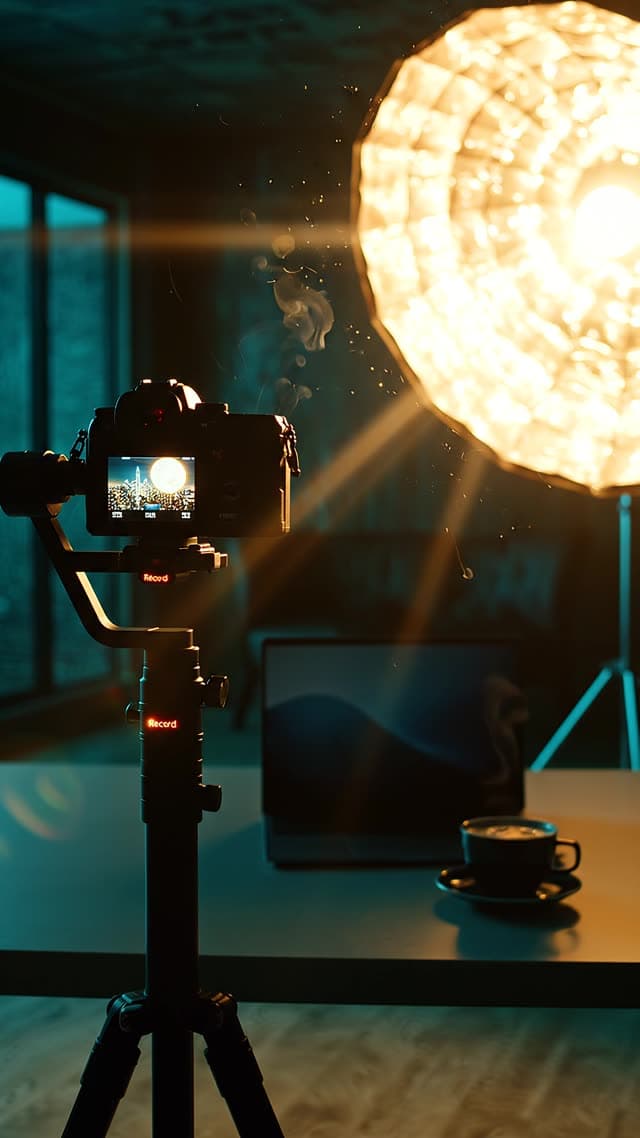
Cinematic vertical 9:16 video, 8 seconds, premium and aspirational,
slow motion, high production value like a luxury tech commercial.

Smooth Steadicam glide through a dark, high-end content-creator studio
at night. We drift past a professional cinema camera on a tripod with a
glowing red record light, past a softbox light blooming warm, over a
sleek desk with a laptop glowing soft blue (abstract light only), a
single coffee steaming. Over the shoulder of a faceless creator - only
their silhouette and hands, back to camera - as they adjust the camera.
The shot rises and pushes toward a floor-to-ceiling window revealing a
glittering city skyline at night. Lens flares, floating dust in the
light beams, shallow depth of field, cinematic teal-and-gold color
grade, moody but hopeful and expensive.

Audio: an inspiring cinematic build - one soft deep boom on the first
frame, then a warm rising synth swell with a subtle heartbeat pulse and
a shimmer of hopeful bells, climbing to a satisfying hit at the end.
A crisp camera-shutter click and a soft whoosh on the move. Ambient
night room tone. No spoken dialogue, no voiceover.

Negative: no text, no numbers, no letters, no captions, no logos, no
brand marks, no visible faces, no screens with readable content.
Why it works: It splits picture, sound and exclusions into three blocks. The audio block reads like a music brief: a boom on the first frame, a rising synth, a hit at the end. It adds two foley cues (a shutter click and a whoosh), and “No spoken dialogue, no voiceover” stops the model from adding a narrator. Our frame grabs follow the shot list: camera, softbox, laptop and steaming coffee, then the window and the skyline.
Rising revenue chart with synced sound effects
Veo 3.1 Lite · 9:16 · 1080p · 8 s · audio on
Cost for this exact setting today: 5 credits (about $1.07–$1.25) (dollar range depends on your plan or pack)
Scene: a sleek matte-black home-office desk at night, shot in extreme
shallow depth of field. The only light is the cold blue-white glow of a
single monitor sitting low in the frame. On the screen: a green revenue
line chart climbing sharply while a large subscriber counter ticks
upward fast, from 12,400 toward 98,000. The entire upper two-thirds of
the frame is dark, atmospheric empty space - soft shadow, drifting dust
particles floating through one thin shaft of light, faint reflection of
the rising graph glowing on the glossy black desk. A single gold coin-like
glint of bokeh in the background.

Camera: slow, smooth dolly push-in that settles gently.

Style: high-end tech-ad meets breaking-news teaser. Deep black and
charcoal with electric blue and a hint of gold. Expensive, mysterious,
cinematic.

Audio: a tense cinematic riser building into ONE deep sub-bass boom on
the first frame (breaking-news impact), then a low pulsing electronic
heartbeat drone underneath. Crisp UI 'ping' and soft cash-register
'cha-ching' sound effects each time the numbers tick up. Subtle ambient
room tone. No spoken dialogue, no voiceover.

Negative: no on-screen text, no captions, no subtitles, no watermarks,
no logos, no UI clutter beyond the simple chart and counter.
Why it works: It ties each sound effect to something on screen (a cash-register “cha-ching” each time the numbers tick up). That is how you ask for synced sound rather than a soundtrack laid over the top.
Watch out: It asks the screen to count from 12,400 to 98,000. Numbers on screen are generated text and may not count cleanly.
Tiny figurines and a hand clearing a drain
Veo 3.1 Fast · 9:16 · 1080p · 8 s · audio on
Cost for this exact setting today: 10 credits (about $2.13–$2.50) (dollar range depends on your plan or pack)
The tiny figurines continue seeking higher ground as floodwater rises across the platform.
A real human hand enters slowly from the top of the frame holding a drain hook, moving with calm deliberate purpose.
The hand lifts the blocked drain cover and the water rapidly drains away, revealing dry ground.
The hand slowly withdraws upward and exits the top of the frame.
The tiny figurines stop, look upward, then celebrate by cheering and helping each other toward the exit.
3D render style throughout. Static camera, no pans, no zooms, no tilts. Natural ambient sound. No music.
Why it works: Two short constraints cover camera and sound: “Static camera, no pans, no zooms, no tilts” and “Natural ambient sound. No music.” The action is a clear cause and effect: the drain opens, the water goes, the figures cheer.
Real prompts that came out silent
Each of these asks for speech or sound, and each video file has no sound track. The gallery doesn't record whether With Audio was on, so the likeliest cause is that it was off; the generator also warns that some videos come back silent even with audio on.
A written line on a clip with audio off
Veo 3.1 Lite · 16:9 · 1080p · 8 s · audio off
Cost for this exact setting today: 3 credits (about $0.64–$0.75) (dollar range depends on your plan or pack)
A dental surgery consultation room, warm clinical lighting. A well-groomed
man in his fifties, expensive suit, sits back in the chair with total
composure, chin slightly raised, looking down at the viewer. He speaks
calmly, with quiet authority, as if the outcome were already decided.

He says: "I know exactly what I want."

Cinematic slow push-in. Photorealistic 3D render at maximum realism, looks
like real filmed people, NOT Pixar, NOT cartoon, NOT doll-like, NOT plastic.
Shallow depth of field, muted professional colour palette. 8 seconds,
natural lip sync, no background music.
Why it works: The line “I know exactly what I want.” is in the prompt, but the clip was generated with audio off, so the file has no sound track at all. The prompt is otherwise a good dialogue setup: who, where, how he speaks, and a camera move.
With audio on, this exact setting would have cost 5 credits (about $1.07–$1.25) instead of 3.
Sound cues on a silent Quality clip
Veo 3.1 (Quality) · 9:16 · 720p · 4 s · audio off
Cost for this exact setting today: 7 credits (about $1.49–$1.75) (dollar range depends on your plan or pack)
Two warriors crouched above a river, watching a distant tribe across the water.
Audio: slow river flow, wind through grass, faint distant voices, low ominous hum.
Why it works: Four sound cues (river, wind, distant voices, a low hum), all ignored because audio was off. Short prompts like this are a good test of sound design, but only with With Audio switched on.
With audio on, this exact setting would have cost 13 credits (about $2.77–$3.25) instead of 7.
“Ambient electronics only” on a silent clip
Veo 3.1 Fast · 16:9 · 720p · 8 s · audio off
Cost for this exact setting today: 6 credits (about $1.28–$1.50) (dollar range depends on your plan or pack)
The waveform slowly disappears from the monitor until only a flat line remains. Camera gently pulls back into the quiet control room. Ambient electronics only.
Why it works: The sound direction is right: one short line that rules out music. With audio off, though, there is nothing to hear.
With audio on, this exact setting would have cost 10 credits (about $2.13–$2.50) instead of 6.
If sound is on and still missing, our guide to the Veo no-audio problem goes through the other causes, and the page on garbled subtitles covers text appearing on dialogue clips.
Two templates to adapt
The gallery has few two-person exchanges and no voiceover written as a reusable pattern, so we wrote these from the examples above. They are ours, not gallery prompts.
Template — not from the gallery
Two people, one exchange
Medium two-shot in [place], [lighting]. [Person A: age, look, clothing] faces [Person B: age, look, clothing].
[Person A]: "[short line, under 10 words]"
[Person B] pauses, then: "[short reply, under 10 words]"
Audio: [room sound], no music, no subtitles.
Two short lines fit in 8 seconds; two long ones won’t. Describing both people stops the model guessing who is who.
Template — not from the gallery
Product voiceover
Voiceover ([voice: e.g. warm female, mid-30s, American accent]): "[one sentence about the product, under 20 words]"
Video: [product] on [surface], [one action], [one camera move], [lighting].
Audio: voiceover only, soft room tone, no music. No on-screen text.
Voiceover first under its own label, then the picture, as in the coffee-ad example above. Leave music out and add it in the edit, where you control the mix.
Frequently asked questions
How do I make a Veo 3.1 character speak?
Switch With Audio on, describe the speaker and the scene, then put the exact line in quotation marks: either Speaker: "line", as the gallery prompts here do, or A woman says, "line", as Google’s prompting guide does. Keep it to about one sentence for an 8-second clip.
Why did my video come out without sound?
Check With Audio first: sound is only generated when it is on. In our gallery check, 89 of 155 videos had no sound track, several of them with dialogue or sound cues in the prompt. The generator also notes that audio is experimental and some videos may not include sound even with it on, so check your first take before generating a batch.
How much more does sound cost?
It depends on the model. An 8-second Fast clip at 1080p costs 6 credits silent and 10 with sound; the table on this page lists every model.
Can Veo 3.1 speak languages other than English?
Our gallery includes clips whose prompts ask for narration in Turkish and Hindi and a line in Spanish, and each file has a sound track. We have not checked pronunciation, so listen before you publish.
How do I stop the model adding subtitles to dialogue?
Say so in the prompt (“no subtitles, no text overlay”), as the Turkish documentary prompt on this page does, and add captions yourself in the edit.
How we checked: prompts quoted from the public gallery on November 8, 2026. For each video we checked whether the file has a sound track and that it isn’t silent (we measured the volume); we did not transcribe the speech. Costs come from our current price list. More examples are in the prompt library.
Sources
Prices, model specs and dates on this page were checked on November 8, 2026. Third-party prices change; check the source before you rely on a number.