Updated November 2026

Cinematic and product shot prompts for Veo 3.1

12 real prompts from our public gallery for product ads, phone-style UGC and cinematic shots. Each has the settings measured from the video file, today’s credit cost for that exact setting, and our notes on what worked and what didn’t.

Key takeaways

  • The best product prompts are a sequence of beats: the problem, the reaction, the reveal.
  • For a phone-footage (UGC) look, name the flaws of phone video and rule out the polished look in so many words.
  • Split long prompts into picture, sound and “negative” blocks so each can be changed on its own.
  • Draft on Lite at 720p (2 credits for a silent 8-second clip), then render the keeper on Fast or Quality.

Copy a prompt below and swap in your product

Text-to-video, or upload your product photo with Image-to-Video. You see the credit cost before you generate.

Sign in with Google to create an account; buy credits only when you need them.

Three prompts, taken apart

We picked three prompts with structures you can reuse. The left column quotes the prompt; the right says what each part is for. Where we say what the video shows, it’s from frames we pulled from the file.

The three-beat problem hook

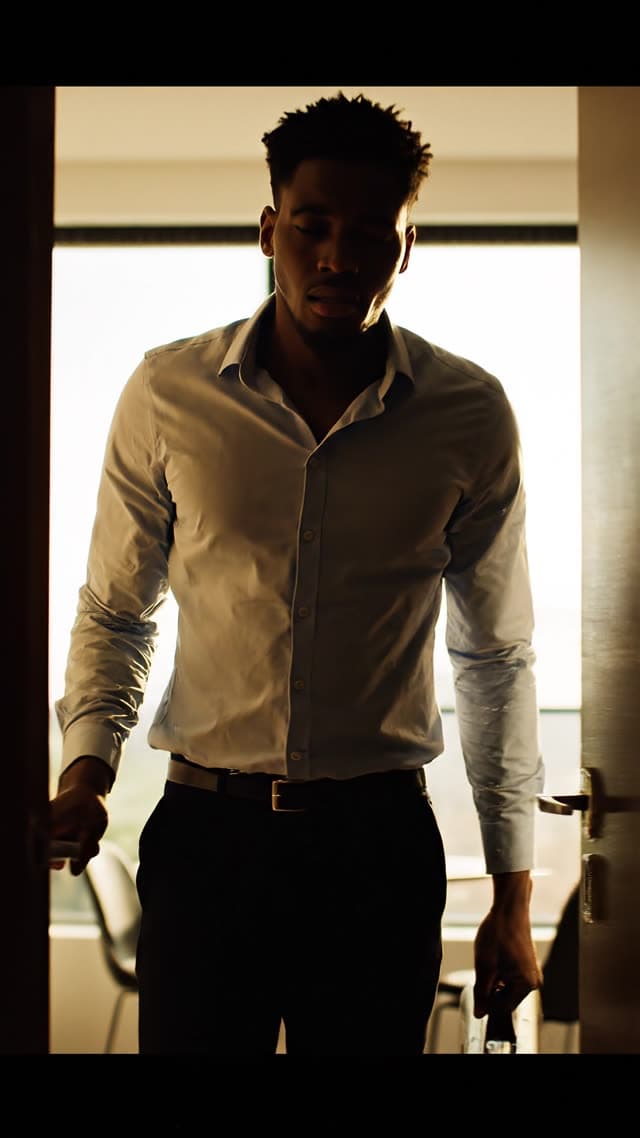
Soaked shoes after work (Veo 3.1 Fast, 6 credits (about $1.28–$1.50)).

Prompt textWhat it does
“0-1.5s: A young man arrives home from work, opening the door to a modern apartment, tired expression”Beat 1 sets up who and where, and plants the mood (tired) before anything happens.
“1.5-2.5s: Close-up on his face — disgusted, annoyed expression as he looks down”Beat 2 is a reaction with no explanation yet. Looking down points the viewer at the next shot.
“2.5-4s: Camera tilts and zooms down slowly to his feet, revealing visibly soaked, sweat-drenched shoes”Beat 3 is the reveal, driven by a camera move rather than a cut. In our frame grabs, late in the clip, the shot is a close-up of wet shoes.
“Aspect ratio: 9:16, resolution 1080x1920, vertical format.”Harmless, but it does nothing. The clip is vertical because 9:16 was picked in the Aspect Ratio control.

The timestamps add up to 4 seconds, but the clip was generated at 8, so the beats play slower than planned. Match the plan to the Duration setting, or leave timestamps out and give the order only.

Realism by ruling out the “AI look”

Unpolished phone footage of wet boots (Veo 3.1 Lite, 3 credits (about $0.64–$0.75)).

Prompt textWhat it does
“filmed handheld on an iPhone by an amateur — visible micro-shake, slightly tilted framing, brief autofocus hunting at the start”Names three concrete flaws of phone video instead of the vague “UGC style”.
“Deep focus, everything sharp, no shallow depth of field, no bokeh.”Phones keep most of the frame sharp; blurred backgrounds read as a cinema camera.
“Cramped, lived-in German apartment hallway: shoe rack with other shoes, jackets hanging on wall hooks, radiator, scuffed white walls.”Specific clutter makes a set look lived-in.
“Dull, unedited colors, no color grading, no cinematic look, not slow motion, real-time speed.”Rules out the default polish in plain words.
“A hand reaches in and squeezes the soaked boot tongue, water visibly seeping out.”The single action that gives the clip its point.
“Audio: rain against the window, radiator ticking, wet squelch, an annoyed sigh.”Not heard: the file has no sound track (audio was off, or the model returned none).

Picture, sound and exclusions in separate blocks

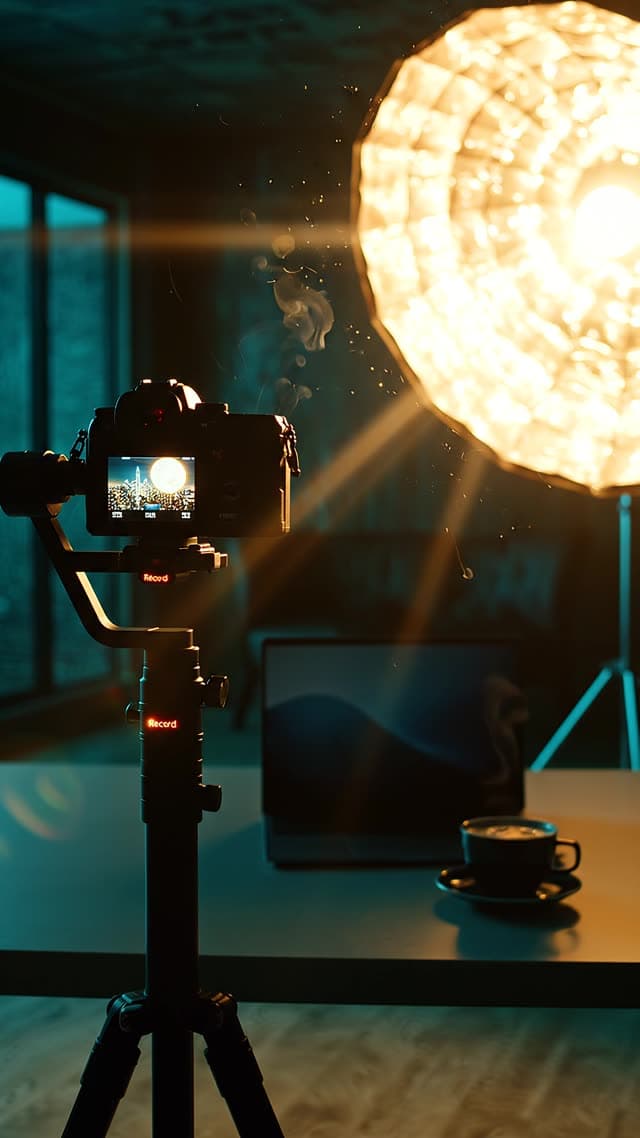
Night-time creator studio (Veo 3.1 Lite, 5 credits (about $1.07–$1.25)).

Prompt textWhat it does
“Smooth Steadicam glide through a dark, high-end content-creator studio at night. We drift past …”One continuous camera path with a list of things to pass, in order. Our frame grabs show the camera, softbox, laptop and steaming coffee.
“a faceless creator - only their silhouette and hands, back to camera”Avoids a face that would have to look right and stay consistent.
“The shot rises and pushes toward a floor-to-ceiling window revealing a glittering city skyline at night.”The ending. Late frames show the window and the skyline.
“Audio: an inspiring cinematic build - one soft deep boom on the first frame …”A music brief with timing, plus two foley cues. This file does have a sound track.
“Negative: no text, no numbers, no letters, no captions, no logos …”Keeps the frame clean for text added in the edit.

Product and UGC prompts

Problem hooks, phone-style footage and product moments. All are text-to-video; for your own product, use the same structure with Image-to-Video (see Veo 3.1 image-to-video).

Still from the Veo 3.1 Fast gallery video: Product-problem hook: soaked shoes after work

Product-problem hook: soaked shoes after work

Veo 3.1 Fast · 9:16 · 1080p · 8 s · audio off

Cost for this exact setting today: 6 credits (about $1.28–$1.50) (dollar range depends on your plan or pack)

Watch “Product-problem hook: soaked shoes after work” in the gallery

Prompt (verbatim)

4-second vertical video, realistic, cinematic, product-problem showcase.

0-1.5s: A young man arrives home from work, opening the door to a modern apartment, tired expression, evening light through windows.

1.5-2.5s: Close-up on his face — disgusted, annoyed expression as he looks down, wrinkling his nose.

2.5-4s: Camera tilts and zooms down slowly to his feet, revealing visibly soaked, sweat-drenched shoes. Slow zoom emphasizes the wet fabric and discomfort.

Style: realistic, natural indoor lighting, smooth camera movement, shallow depth of field on the zoom shot, relatable everyday setting.

Aspect ratio: 9:16, resolution 1080x1920, vertical format.

Why it works: This is a classic ad opening in three timed beats: arrival, a reaction close-up, then the problem revealed. Timestamps give the model an order of events. Our frame grabs move from the man’s face to a close-up of wet shoes, as written.

Watch out: The prompt plans 4 seconds, but the clip was generated at 8, so the beats stretch. Our frame grabs also show black bars above and below the picture inside the 9:16 frame. Check for that before you post to a vertical feed.
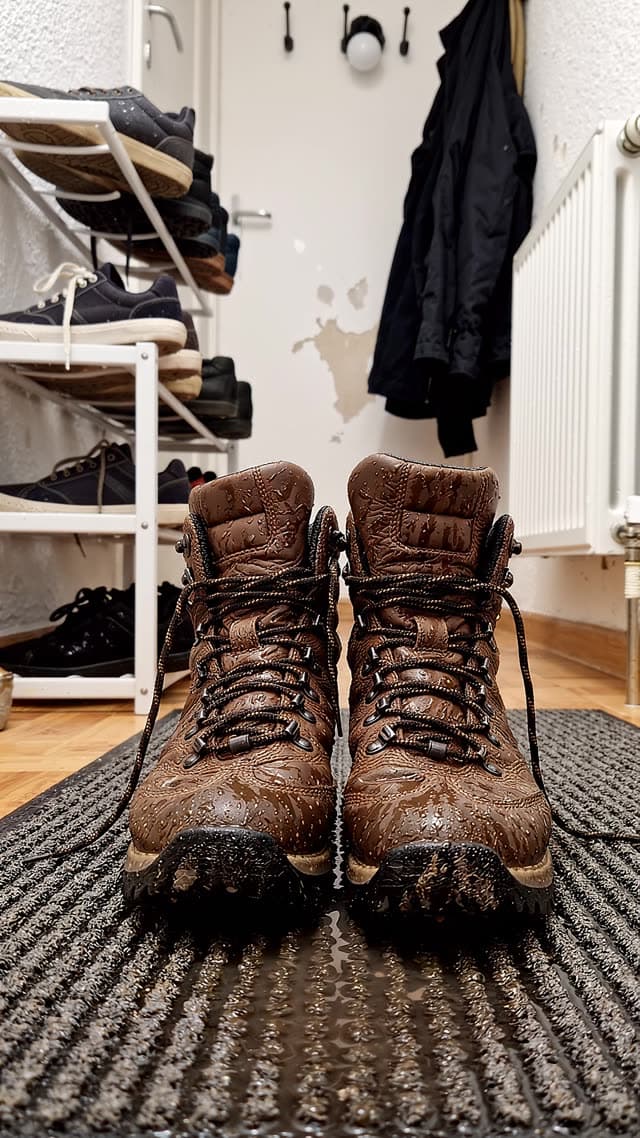
Still from the Veo 3.1 Lite gallery video: Deliberately unpolished phone footage of wet boots

Deliberately unpolished phone footage of wet boots

Veo 3.1 Lite · 9:16 · 1080p · 6 s · audio off

Cost for this exact setting today: 3 credits (about $0.64–$0.75) (dollar range depends on your plan or pack)

Watch “Deliberately unpolished phone footage of wet boots” in the gallery

Prompt (verbatim)

Vertical 9:16 video, raw smartphone footage, filmed handheld on an iPhone by an amateur — visible micro-shake, slightly tilted framing, brief autofocus hunting at the start. Deep focus, everything sharp, no shallow depth of field, no bokeh. A pair of well-worn brown leather hiking boots, heavily soaked: dark water stains creeping up the leather, mud splatters up to the ankle, swollen dirty laces, a small puddle forming on a cheap ribbed doormat. Cramped, lived-in German apartment hallway: shoe rack with other shoes, jackets hanging on wall hooks, radiator, scuffed white walls. Flat, unflattering mixed lighting — grey daylight from a window plus a warm ceiling bulb, slightly overexposed near the window. Dull, unedited colors, no color grading, no cinematic look, not slow motion, real-time speed. A hand reaches in and squeezes the soaked boot tongue, water visibly seeping out. Audio: rain against the window, radiator ticking, wet squelch, an annoyed sigh.

Why it works: It gets an amateur look by naming the flaws of phone footage: micro-shake, tilted framing, autofocus hunting, an overexposed window. Then it rules out the polished “AI look” in so many words: no bokeh, no color grading, not slow motion, real-time speed. The cramped hallway with specific props reads as a real home.

Watch out: It ends with sound cues (rain, a ticking radiator, a sigh), but the clip was generated with audio off, so the file has no sound track. Sound cues only matter when With Audio is on.

Still from the Veo 3.1 (Quality) gallery video: POV: a foot slides into a damp running shoe

POV: a foot slides into a damp running shoe

Veo 3.1 (Quality) · 9:16 · 1080p · 6 s · audio off

Cost for this exact setting today: 10 credits (about $2.13–$2.50) (dollar range depends on your plan or pack)

Watch “POV: a foot slides into a damp running shoe” in the gallery

Prompt (verbatim)

Vertical 9:16 smartphone video, UGC style. POV shot: a foot in a white sock slides into a damp running shoe by the front door, early morning light. The person pulls the foot back out immediately in discomfort. Handheld, realistic amateur footage, shot on iPhone, natural colors, shallow depth of field. Audio: the damp fabric sound, a disgusted "ugh" grunt, birds chirping faintly outside.

Why it works: One first-person action with an immediate reaction. This is the “relatable problem” shot that short ads often open on, and the prompt is short because every phrase is concrete.

Watch out: Generated on Quality with audio off, so the “ugh” in the prompt was never voiced. If the sound is the point, switch audio on. For this setting that doubles the credits.

Still from the Veo 3.1 Fast gallery video: Soda bottle bouncing down a staircase

Soda bottle bouncing down a staircase

Veo 3.1 Fast · 16:9 · 1080p · 8 s · audio off

Cost for this exact setting today: 6 credits (about $1.28–$1.50) (dollar range depends on your plan or pack)

Watch “Soda bottle bouncing down a staircase” in the gallery

Prompt (verbatim)

A giant transparent glass bottle filled with bright red soda is resting on the first stair.


No people. No hands. No human body parts visible.


The bottle is released and begins rolling DOWN THE ENTIRE STAIRCASE.


The camera remains fixed at the top, watching the bottle travel downward.


The bottle hits the first stair and bounces.


The bottle hits the second stair and bounces.


The bottle hits the third stair and bounces.


The bottle hits the fourth stair and bounces.


The bottle hits the fifth stair and bounces.


The bottle continues rolling and bouncing down many visible stairs.


The bottle remains completely intact during all of these impacts.


Show the bottle physically contacting every stair step while descending.


After traveling approximately halfway down the staircase, the bottle strikes a stair edge with extreme force.


Only then does the glass bottle shatter into hundreds of realistic glass fragments.


A massive explosion of bright red soda erupts outward and splashes across multiple stairs.


The liquid flows naturally down the staircase. Glass fragments scatter across many steps.


The entire staircase must remain visible throughout the video.


Focus on the rolling motion and repeated stair impacts before the breaking event.


Photorealistic physics, realistic gravity, realistic glass destruction, realistic fluid simulation, cinematic slow motion at the moment of breaking, viral Instagram reel style, outdoor daylight, ultra realistic 4K.


Vertical 9:16.

Why it works: It breaks one physical event into numbered beats (bounce, bounce, bounce, then shatter) and says exactly when the break happens: about halfway down. The repeated “The bottle hits the … stair” lines read clumsily, but they leave the model no room to shatter the bottle on the first step. In our frame grabs the bottle is still intact early in the clip and has burst into a red splash later on.

Watch out: The prompt says “Vertical 9:16” and “4K”, but the file is 1920×1080 landscape. The Aspect Ratio and Resolution controls decide the frame; words in the prompt do not.

Still from the Veo 3.1 Fast gallery video: Miniature chef in a farmhouse kitchen (food ad)

Miniature chef in a farmhouse kitchen (food ad)

Veo 3.1 Fast · 9:16 · 1080p · 8 s · audio off

Cost for this exact setting today: 6 credits (about $1.28–$1.50) (dollar range depends on your plan or pack)

Watch “Miniature chef in a farmhouse kitchen (food ad)” in the gallery

Prompt (verbatim)

**PROJECT TITLE:** Miniature Chocolate Cake – Premium Cinematic Food Commercial

Create an ultra-photorealistic handcrafted miniature world where every object is built to perfect scale. The setting is an enchanting miniature farmhouse kitchen. The main character is a 5 cm tall professional chef who remains perfectly identical throughout the film. The chef wears a pristine white double-breasted chef jacket with fine stitching, a spotless white apron, a tall traditional white chef hat, dark brown leather shoes, and uses handcrafted walnut cooking utensils. Never change the chef's appearance, proportions, clothing, or facial features.

The kitchen contains polished walnut countertops, terracotta tile flooring, handmade ceramic bowls, porcelain plates, copper cookware hanging from brass hooks, glass spice jars, miniature cutting boards, linen towels, a brick wood-fired oven, fresh herbs in clay pots, lace curtains, and warm golden sunrise light entering through small windows.

Visual style: true macro cinematography, premium food commercial, 85 mm macro lens, extremely shallow depth of field, creamy cinematic bokeh, HDR, ray-traced reflections, physically based rendering, volumetric sunlight, realistic steam simulation, realistic liquid physics, realistic food textures, global illumination, subtle floating dust particles, warm cinematic color grading.

Aspect ratio: 9:16.

Resolution: 4K or higher.

Frame rate: 60 fps.

No text, no subtitles, no logos, no watermark.

Why it works: It fixes the character’s look with a “never change” line and builds the set from concrete props: walnut counters, copper pans, terracotta tiles. One lighting idea (sunrise through small windows) does the rest. Ending with “No text, no subtitles, no logos, no watermark” is a good habit for ad footage you plan to caption yourself.

Watch out: It describes the set and style in detail but never says what the chef does, so the model chooses the action. It also asks for 4K and 60 fps; the file is 1080p at 24 fps.

Still from the Veo 3.1 Lite gallery video: Snack pouch reveal, written as a JSON shot list

Snack pouch reveal, written as a JSON shot list

Veo 3.1 Lite · 9:16 · 720p · 4 s · audio on

Cost for this exact setting today: 2 credits (about $0.43–$0.50) (dollar range depends on your plan or pack)

Watch “Snack pouch reveal, written as a JSON shot list” in the gallery

Prompt (verbatim)

{
  "scene": 10,
  "title": "Taste Payoff / Package Reveal",
  "duration_seconds": 2,
  "aspect_ratio": "9:16",
  "style": "Dynamic product close-up, satisfying tactile visuals",
  "subject": "Small glass bowl, snack pouch",
  "environment": "Kitchen counter surface",
  "action": "Shot A: high-angle close-up of a small glass bowl spinning fast on the counter. Shot B: first-person POV close-up of thumbs peeling open the top of a snack pouch to reveal walnuts inside",
  "camera": {
    "shot_type": "High-angle close-up, then first-person POV close-up",
    "movement": "Spinning motion blur, then POV hand movement",
    "lens_feel": "Macro/close-up, crisp detail"
  },
  "lighting": "Bright even kitchen lighting",
  "text_overlay": {
    "style": "Lower-third centered caption, white sans-serif font, soft black drop shadow; final line pops in bold capitalized formatting",
    "position": "Lower third of frame",
    "wording": "it's a habit you'll actually stick to\nbecause they taste so good\nSO GOOD"
  },
  "dialogue_voiceover": "It's a habit you'll actually stick to because they taste so good.",
  "sound_design": "Background music continues; crisp synced 'pop' and 'tear' sound of packaging opening",
  "mood": "Satisfying, exciting, appetite-triggering",
  "negative_prompt": "no muffled or missing sound sync, no slow-motion effect"
}

Why it works: A JSON object puts every decision in a named field (camera, lighting, on-screen text, voiceover, sound design, negatives), so a batch of scenes stays consistent. This is scene 10 of a series; scenes 7 to 10 are all in the gallery.

Watch out: It asks for 2 seconds, but the shortest clip is 4. It also asks for on-screen captions. Generated text can come out misspelled, so captions are safer added in your editor.

Test an idea on Lite for a few credits before you spend on Fast or Quality.

Open the generator

Cinematic prompts

Macro shots, moody silhouettes and text-free backgrounds for titles, websites and openers.

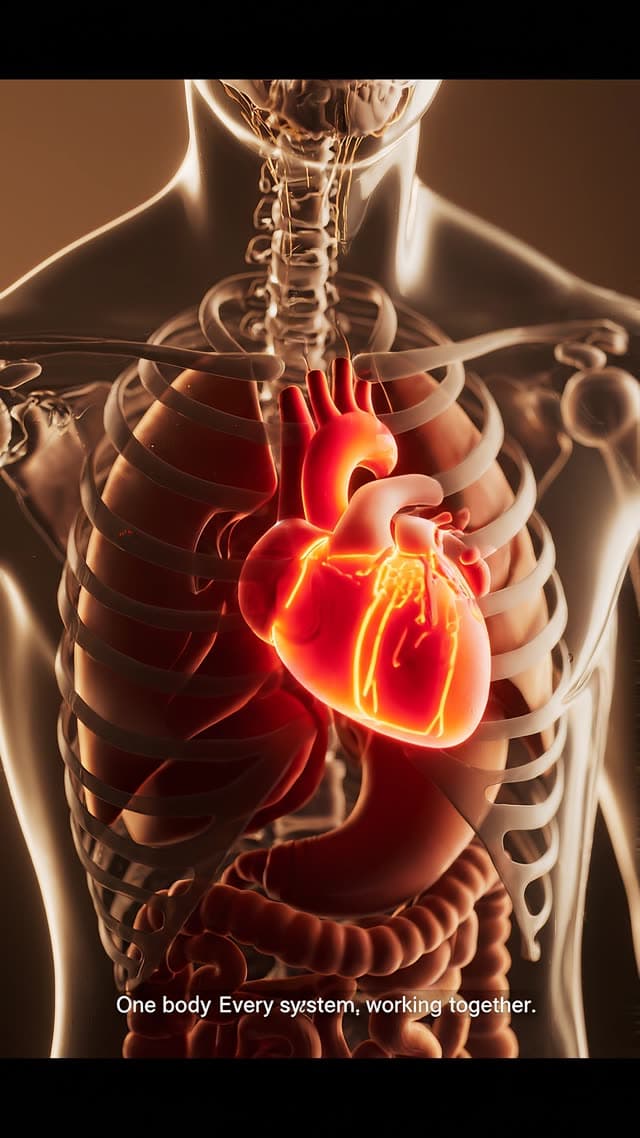
Still from the Veo 3.1 Fast gallery video: Miniature anatomical model with a caption

Miniature anatomical model with a caption

Veo 3.1 Fast · 9:16 · 1080p · 8 s · audio on

Cost for this exact setting today: 10 credits (about $2.13–$2.50) (dollar range depends on your plan or pack)

Watch “Miniature anatomical model with a caption” in the gallery

Prompt (verbatim)

Wide macro shot of a miniature full human body anatomical model, transparent resin shell revealing every major organ in cross-section at once: a beating red heart, coral-textured breathing lungs, a pulsing digestive tract, glowing brain and spinal pathways, layered bone structure. Tabletop diorama scale, soft studio lighting, slow orbiting camera reveal, tactile miniature-model realism. Camera passes highlight one organ at a time in sequence — heart, then lungs, then digestive system, then brain — each briefly glowing before fading back, showing the body as one connected working system. Warm neutral backdrop, cinematic depth of field. Bottom-third caption, clean sans-serif: "One body. Every system, working together." 10-12 second loopable clip, slow orbit.

Why it works: It has one strong idea (a transparent body model), a camera plan (“slow orbiting camera reveal”) and an order for the highlights: heart, lungs, digestive system, brain. In our frame grabs the caption rendered almost word for word (“One body Every system, working together.”). That is close, but the first period is missing, which is typical of generated text.

Watch out: It asks for a 10–12 second loop; clips top out at 8 seconds.

Still from the Veo 3.1 Lite gallery video: Night-time creator studio with a music cue

Night-time creator studio with a music cue

Veo 3.1 Lite · 9:16 · 1080p · 8 s · audio on

Cost for this exact setting today: 5 credits (about $1.07–$1.25) (dollar range depends on your plan or pack)

Watch “Night-time creator studio with a music cue” in the gallery

Prompt (verbatim)

Cinematic vertical 9:16 video, 8 seconds, premium and aspirational,
slow motion, high production value like a luxury tech commercial.

Smooth Steadicam glide through a dark, high-end content-creator studio
at night. We drift past a professional cinema camera on a tripod with a
glowing red record light, past a softbox light blooming warm, over a
sleek desk with a laptop glowing soft blue (abstract light only), a
single coffee steaming. Over the shoulder of a faceless creator - only
their silhouette and hands, back to camera - as they adjust the camera.
The shot rises and pushes toward a floor-to-ceiling window revealing a
glittering city skyline at night. Lens flares, floating dust in the
light beams, shallow depth of field, cinematic teal-and-gold color
grade, moody but hopeful and expensive.

Audio: an inspiring cinematic build - one soft deep boom on the first
frame, then a warm rising synth swell with a subtle heartbeat pulse and
a shimmer of hopeful bells, climbing to a satisfying hit at the end.
A crisp camera-shutter click and a soft whoosh on the move. Ambient
night room tone. No spoken dialogue, no voiceover.

Negative: no text, no numbers, no letters, no captions, no logos, no
brand marks, no visible faces, no screens with readable content.

Why it works: It splits picture, sound and exclusions into three blocks. The audio block reads like a music brief: a boom on the first frame, a rising synth, a hit at the end. It adds two foley cues (a shutter click and a whoosh), and “No spoken dialogue, no voiceover” stops the model from adding a narrator. Our frame grabs follow the shot list: camera, softbox, laptop and steaming coffee, then the window and the skyline.

Still from the Veo 3.1 Fast gallery video: Victorian silhouette walking into fog

Victorian silhouette walking into fog

Veo 3.1 Fast · 9:16 · 1080p · 8 s · audio off

Cost for this exact setting today: 6 credits (about $1.28–$1.50) (dollar range depends on your plan or pack)

Watch “Victorian silhouette walking into fog” in the gallery

Prompt (verbatim)

A mysterious silhouette wearing a long Victorian coat and top hat walks away from the camera into dense London fog. His identity remains completely hidden. Dramatic backlighting from gas lamps creates a haunting silhouette. Suspenseful cinematic composition, realistic environment, no violence, psychological thriller atmosphere

Why it works: Short and visual: one subject, one action, one light source (gas lamps behind) and one mood. “His identity remains completely hidden” is a useful trick when you don’t want a face that has to stay consistent across clips.

Still from the Veo 3.1 (Quality) gallery video: Supernova and comet for a website hero

Supernova and comet for a website hero

Veo 3.1 (Quality) · 16:9 · 1080p · 6 s · audio off

Cost for this exact setting today: 10 credits (about $2.13–$2.50) (dollar range depends on your plan or pack)

Watch “Supernova and comet for a website hero” in the gallery

Prompt (verbatim)

Cinematic wide shot of a deep, photorealistic night sky. In the center, a breathtaking supernova slowly expands, radiating deep purple, cyan, and gold cosmic dust. A bright comet with a glowing tail falls diagonally across the frame. The background is filled with glowing constellations, pulsating stars, and a subtle meteor shower. Highly detailed, 8k resolution, slow and smooth forward camera movement, dark background, suitable for a website hero section.

Why it works: It names the use (“suitable for a website hero section”) and asks for a dark background with slow forward movement, which is what a hero loop needs behind text.

Still from the Veo 3.1 Fast gallery video: Research desk with a “glitching reality” overlay

Research desk with a “glitching reality” overlay

Veo 3.1 Fast · 16:9 · 1080p · 8 s · audio on

Cost for this exact setting today: 10 credits (about $2.13–$2.50) (dollar range depends on your plan or pack)

Watch “Research desk with a “glitching reality” overlay” in the gallery

Prompt (verbatim)

A highly-detailed, ultra-realistic cinematic video shot, captured on a Canon EOS C70 with natural film grain, focuses on a cluttered, vintage wooden desk in a quiet, nocturnal study. There is no human figure present. The desk is laden with items reflecting intense research: stacks of old, worn books with titles like 'QUANTUM PHENOMENA' and 'THE NATURE OF EXISTENCE', a small, vintage ceramic teacup on a saucer, several metal-cased pens, and a magnifying glass. In the foreground, spanning across a leather-bound journal and the teacup, a subtle, ethereal, faintly glowing geometric wireframe grid and streams of white binary code (0s and 1s) pulse and ripple over the physical objects, as if reality is glitching and revealing its simulated underlying structure. A warm, vintage desk lamp provides the primary light source, casting soft shadows, while in the far background, a blurred computer monitor displays scrolling code and abstract data visualizations, adding a cool, blue counter-light. Dust motes dance in the warm lamp light. The scene has a shallow depth of field, rendering the far background items softly blurred, emphasizing the intersection of the physical objects and the digital simulation overlay on the desk surface. The camera performs a slow, steady tracking pan across the desk, capturing the intricate textures of worn wood, leather, paper, and ceramic alongside the subtle digital anomalies. The mood is silent, contemplative, and unsettlingly technological."

Why it works: It builds the scene from layered light (a warm lamp in front, a cool monitor glow behind) and one camera move (a slow tracking pan), then adds a single effect on top. “There is no human figure present” keeps the shot about the objects.

Watch out: It names book titles. Generated text on props can come out garbled, so don’t rely on it for anything that must be legible.

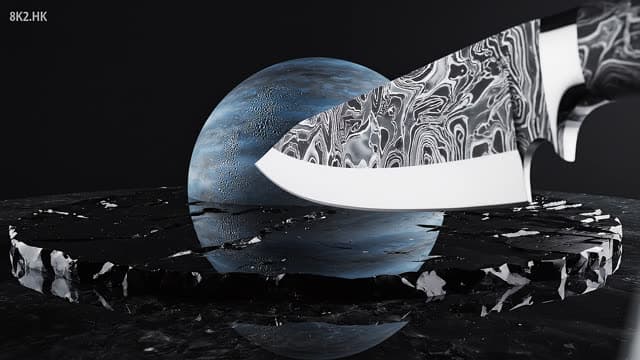
Still from the Veo 3.1 Fast gallery video: Chef’s knife slicing a model of Neptune (macro)

Chef’s knife slicing a model of Neptune (macro)

Veo 3.1 Fast · 16:9 · 1080p · 8 s · audio on

Cost for this exact setting today: 10 credits (about $2.13–$2.50) (dollar range depends on your plan or pack)

Watch “Chef’s knife slicing a model of Neptune (macro)” in the gallery

Prompt (verbatim)

Ultra-photorealistic 8-second single-take cinematic macro sequence. Perfectly scaled 3D model of planet Neptune positioned on premium matte black obsidian surface within dark infinity studio environment.

Oversized handcrafted Damascus steel chef's knife with mirror-polished edge descends in extreme slow motion at 0.25x speed. Atmospheric contact generates subtle pressure waves, microscopic ice particle emissions, delicate vapor distortion, and surgical precision blade penetration with zero deformation.

Scientifically accurate planetary interior cross-section reveal showcasing cryogenic methane oceans, compressed diamond-ice VII layers, translucent high-pressure fluid chambers, swirling atmospheric vortices, shimmering molecular structures, and bioluminescent core emissions.

Physically accurate electric-blue liquid discharge with realistic fluid dynamics, natural viscosity behavior, splash patterns, ripple propagation, droplet formation, and caustic light reflections.

Extreme macro close-up, 100mm macro prime lens, T2.8, 9-blade aperture. Ultra-smooth motorized dolly-in transitioning into a 180-degree orbital camera movement. Razor-sharp focus on the cross-section with creamy cinematic bokeh. 120fps slow-motion playback, perfectly stable motion control, zero jitter or distortion.

Three-point cinematic lighting setup, volumetric fog, atmospheric scattering, subtle condensation shaders, HDR10+ color space, 8K UHD resolution, ray-traced global illumination, subsurface scattering, path-traced reflections, physically accurate PBR materials.

Single continuous take, ACES color grading, filmic tone mapping, subtle 35mm film grain, natural lens distortion, cinematic vignetting.

Unreal Engine 5.3 Nanite geometry, Lumen dynamic GI, Octane Render photorealism, National Geographic scientific accuracy, luxury product cinematography aesthetic, award-winning VFX quality, hyper-detailed textures, IMAX-quality presentation.

Why it works: The useful parts are concrete: the subject, the slow knife descent, what the cross-section reveals, and one camera move (a dolly-in that becomes a 180° orbit). It shows how much one take can hold when it has a clear beginning, middle and end.

Watch out: Much of the length is render-engine and camera jargon (Unreal Engine, Octane, 8K, 120 fps, HDR10+). The model doesn’t run those tools, and the file is still 1080p at 24 fps. Cutting that block frees up the 2,000-character limit for things the viewer can actually see.

What the same shot costs on each model

Any prompt above runs on any model. Here is one 8-second clip at 1080p (720p for the cheapest Lite option), with and without sound:

Dollar ranges run from our cheapest to our dearest price per credit, depending on the plan or pack you buy.
ModelSilentWith sound
Veo 3.1 Lite, 720p2 credits (about $0.43–$0.50)3 credits (about $0.64–$0.75)
Veo 3.1 Lite, 1080p3 credits (about $0.64–$0.75)5 credits (about $1.07–$1.25)
Veo 3.1 Fast, 1080p6 credits (about $1.28–$1.50)10 credits (about $2.13–$2.50)
Veo 3.1 (Quality), 1080p13 credits (about $2.77–$3.25)26 credits (about $5.55–$6.49)

A sensible loop for product work: try three or four wordings on Lite at 720p with sound off (2 credits each, about $0.43–$0.50), then render the best one on Fast at 1080p (6 credits silent). The Lite vs Fast vs Quality comparison covers what the extra credits buy.

A structure to start from

Template — not from the gallery

Product moment in four lines

Close-up of [your product] on [surface], [lighting, e.g. soft window light from the left].
Action: [one thing that happens, e.g. a hand slides it into frame and turns it to face the camera].
Camera: [one move, e.g. slow push-in that settles on the label].
Negative: no text, no captions, no logos, no watermark.

We wrote this from the patterns above: one action, one camera move, exclusions last. Set aspect ratio, resolution, length and sound in the controls, not in the prompt.

Frequently asked questions

Which model should I use for product shots?

Draft on Lite at 720p to check the idea, then render the keeper on Fast or Quality. Most clips in our gallery (103 of 155 when we checked) were made on Fast.

Can I use my real product photo instead of describing it?

Yes, with Image-to-Video: upload a PNG or JPEG (up to 20 MB) as the first frame and describe the motion. Videos made from uploaded images are never shared to the gallery, which is why every example on this page is text-to-video.

Should product footage have sound?

Only if the sound is part of the shot. Ads usually get music and voiceover in the edit, so audio off is cheaper and avoids clashing sound. Switch audio on when you want the pop of a package or a spoken line.

Can I use videos I generate from these prompts commercially?

Our terms grant a licence to use videos you generate for personal and commercial purposes. Our terms let you reuse the prompts shown in the gallery, not other users’ videos. You still need rights to any real person, brand or product you depict.

How we checked: prompts quoted from the public gallery on November 8, 2026; aspect ratio, resolution, length and sound measured from each MP4; frames pulled from the files for the breakdowns; costs from our current price list. More prompts are in the prompt library.

Sources

Prices, model specs and dates on this page were checked on November 8, 2026. Third-party prices change; check the source before you rely on a number.

Make your own product or cinematic shot

Paste a prompt, pick Lite, Fast or Quality, and see the credit cost before you generate. Failed generations are refunded automatically.

Sign in with Google to create an account; buy credits only when you need them.