OpenAI removed Sora 2 and its Videos API on September 24, 2026, months after the Sora app closed (according to press reports), and named no replacement. The nearest matches for Sora’s mix of native audio, vertical video and image input are Google’s Veo 3.1 and Gemini Omni Flash, Kling 4.0, Seedance 2.5, Wan3.0, Grok Imagine Video 1.5 and MiniMax H3. Runway and Luma fit if you don’t need audio.
Move your Sora prompts to Veo 3.1
Text-to-video, image-to-video and first-and-last-frame, 4 to 8 seconds, up to 4K. Packs start at $9.99 with no subscription.
Sign in with Google to create an account; buy credits only when you need them.
Key takeaways
The Sora app and website closed on April 26, 2026 (press reports); the API followed on September 24, 2026.
No single model copies Sora 2. Pick by the feature you relied on: length, audio, characters or price.
Longest single clips now: 30 s (Kling 4.0, Seedance 2.5, Wan3.0) against Sora 2’s 12 s in its API reference.
Sora 2 cost $0.10/s at 720p; several live models list less per second today.
What happened to Sora
Date
Event
Source
September 30, 2025
Sora 2 and the Sora app launch
Press
March 24, 2026
OpenAI notifies API developers that Sora is being deprecated
OpenAI deprecations page
April 26, 2026
The Sora app and website close
Press
September 24, 2026
sora-2, sora-2-pro and the Videos API are removed, with no replacement
OpenAI deprecations page
Reseller pages for Sora 2 on fal.ai and Replicate now return “not found” as well, so there is no back door. If you still have Sora prompts and outputs, they are your best migration asset: the prompts tell you what each new model has to handle.
What you need to replace
From OpenAI’s own API reference and guide, Sora 2 offered: clips of 4, 8, 12 seconds (the guide also mentions 16 and 20), 1280x720 and 720x1280 output (Sora 2 Pro added larger sizes; OpenAI’s model page lists 1080p, though the API’s size list had no 1080p option), synced native audio, a first-frame image input, up to two reusable “characters”, and extensions. Pricing ended at $0.10/s for Sora 2 at 720p and $0.30/s to $0.70/s for Sora 2 Pro.
The alternatives, side by side
Trimmed to what Sora users ask about: length, resolution, audio, characters (references) and price. Most cells come from the maker’s own documentation; press and reseller figures are labelled in the cell. Prices are approximate API rates per second, cheapest to dearest setting. Only the three Veo 3.1 rows can be generated on imaginary.app. Status, frame control and extension for every model are on the compare hub.
Length, resolution, audio, references and price
Model
Longest single clip
Top resolution
Native audio
Reference inputs
Maker’s API price, about per second
Veo 3.1 (Quality)
8 s (extend to 37 s on Google Cloud)
4K
Yes (can be switched off)
Up to 3 asset images or 1 style image (Google Cloud API)
$0.20/s to $0.60/s
Veo 3.1 Fast
8 s
1080p on Google’s model page; 4K is on Google’s price list and in our generator
Yes
Up to 3 asset images (Google Cloud API)
$0.08/s to $0.30/s
Veo 3.1 Lite
8 s
1080p
Yes
No
$0.03/s to $0.08/s
Gemini Omni Flash 1.2
15 s (extend to 30 s)
720p native; 1080p and 4K by upsampling
Yes (no audio inputs)
Up to 6 images plus short reference videos
≈ $0.023/s (360p) to ≈ $0.209/s (4K upsampled); Google prices Omni per token
Kling 4.0
30 s in one pass (Flash: 20 s)
1080p; Kling’s own page both claims “up to 4K” and says 4K is “coming soon”
Yes
Up to 10 images, 5 videos and 7 subject elements
Not published for 4.0 (official Kling 3.0 API: $0.084/s to $0.42/s)
Seedance 2.5
30 s
1080p
Yes
Up to 30 images, 10 videos and 10 audio clips
Token-priced; fal.ai’s resale works out to about $0.47/s at 720p
Wan3.0
30 s
1080p
Yes
Up to 10 images, 5 videos and 5 audio clips
$0.05/s (480p) to $0.28/s (Prime, 1080p)
Grok Imagine Video 1.5
15 s
1080p
Yes
Yes (xAI’s docs and news post give different maximums)
$0.02/s (1.5 Lite) to $0.08/s (1.5)
MiniMax H3
15 s
2K
Yes
Up to 9 images, 3 videos and 3 audio clips
$0.025/s (H3 Lite) to $0.13/s (H3, 2K)
Pika H3 Flex
15 s
768p native (up to 4K by upscaling)
Yes
Up to 9 images, 3 videos and 3 audio clips
$0.02/s (480p) to $0.16/s (4K upscaled), before launch promos
Runway Gen-4.5
10 s
1280×720-class output sizes in the API
No audio parameter in the official API
Not published
$0.05/s (Gen-4 Turbo) to $0.12/s (Gen-4.5)
Luma Ray3.2
10 s (Modify Video: 20 s)
1080p, with native 16-bit HDR
No
Not published
$0.06/s (720p) to $0.24/s (1080p) at Luma’s default list rate; HDR costs double
Kling 4.0, Seedance 2.5 and Wan3.0 generate up to 30 seconds in one pass; Gemini Omni Flash, Grok Imagine Video 1.5 and MiniMax H3 reach 15. Veo 3.1 stops at 8 seconds per clip, so longer scenes are cut together from shots (our 8-second limit guide shows how).
You made vertical social clips with sound
Veo 3.1, Gemini Omni Flash and Grok Imagine Video 1.5 all do 9:16 with native audio. Runway’s API has no audio setting and Luma Ray3.2 doesn’t generate audio, so they’re a poor swap for this habit.
You relied on characters
The reference-heavy models are the closest replacement: Seedance 2.5 takes up to 30 images, Kling 4.0 up to 10 images and 7 subject elements, and MiniMax H3 up to 9 images. With Veo 3.1 on imaginary.app, the practical tool is image-to-video: start each shot from the same character still, or set a first and last frame (see Veo 3.1 image-to-video).
You want the lowest price per second
Among the makers’ own API prices in the table, the lowest are Grok Imagine Video 1.5 Lite ($0.02/s), Pika H3 Flex at 480p ($0.02/s), Gemini Omni Flash at 360p (≈ $0.023/s; Google prices Omni per token) and MiniMax H3 Lite ($0.025/s). Silent Veo 3.1 Lite at 720p is about $0.03/s on Google Cloud’s list (billed per “count”, which we read as one second). Cheap tiers often mean lower resolution, so compare at the resolution you publish.
You used Sora 2 Pro for 1080p
Veo 3.1 Quality generates 1080p and 4K. Veo 3.1 Fast generates 1080p, and 4K in our generator (Google’s model page lists Fast at 1080p, though its price list includes Fast 4K). Kling 4.0, Seedance 2.5 and Wan3.0 generate 1080p. Gemini Omni Flash reaches 1080p only by upsampling.
A 12-second Sora prompt usually describes two or three beats. Give each beat its own 4, 6 or 8 second clip, and keep the subject description word-for-word identical across shots.
2
Map the frame size
Sora’s 1280x720 maps to 16:9 and 720x1280 to 9:16. Veo 3.1 supports both. Square and other ratios are not available on Veo.
3
Write the sound into the prompt
Veo generates audio from the prompt. Put spoken lines in quotes with who says them, and add an “Audio:” line for ambience and effects. Keep audio switched on in the generator. Keep dialogue short enough to say in the clip length.
4
Replace characters with a first frame
Make or pick one still image per character and use it as the first frame in image-to-video. Use the same still for every shot of that character.
5
Expect content rules of your own
Veo on Google Cloud blocks celebrity likenesses, so prompts built around real, famous people are likely to fail here. The rules are not identical to Sora’s, so test a few prompts before you migrate a batch.
6
Port your API calls
If your code created a Sora video job and polled for it, the shape carries over: on imaginary.app you send POST /api/generate with a veo_ API key and a model such as veo3-fast, then poll GET /api/status/:taskId. Request fields are in the API docs.
Sora-style clips made with Veo 3.1
Two short smartphone-style clips, the kind of thing many people used Sora for, shared publicly by imaginary.app users. One is on the cheapest Veo variant and one on the dearest. Both prompts write out sound cues, but neither shared file has a sound track, so they show the picture only.
Veo 3.1 Lite · 4 s · no sound track
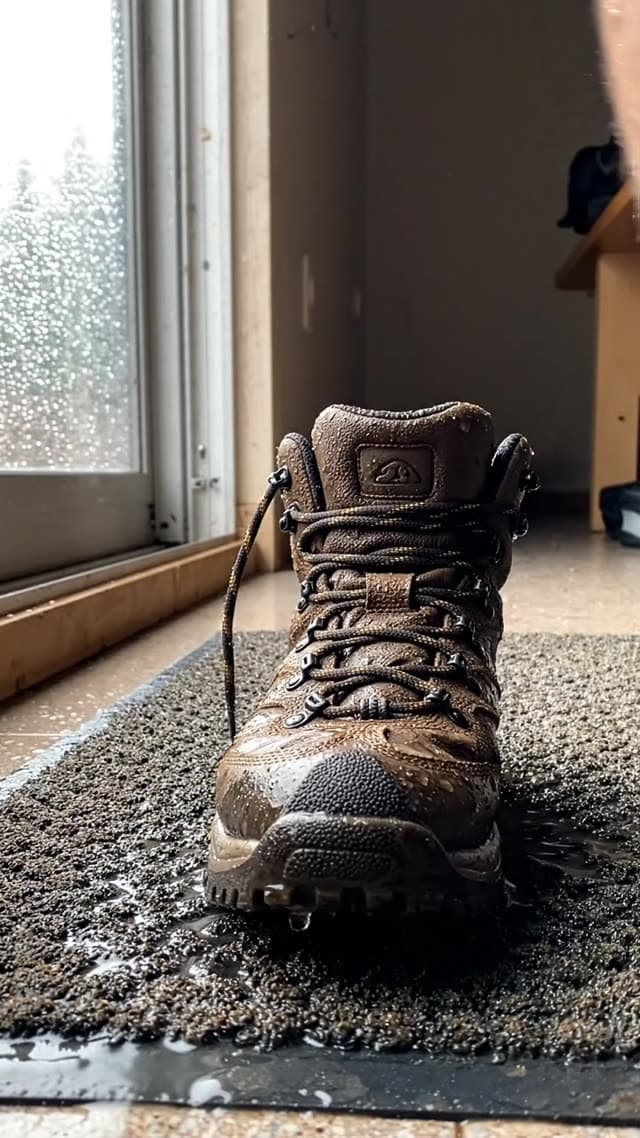
smartphone video, UGC style, handheld with slight natural shake. Close-up of soaking wet hiking boots being dropped onto a doormat in a dim hallway, water dripping off the soles, muddy laces. Rainy day, grey natural light from a window. … Audio: rain pattering outside, a frustrated sigh, the wet squelch of the boot.
Credits for these settings on imaginary.app today: 1 at 720p, 2 at 1080p.
Vertical 9:16 smartphone video, UGC style. POV shot: a foot in a white sock slides into a damp running shoe by the front door, early morning light. The person pulls the foot back out immediately in discomfort. … Audio: the damp fabric sound, a disgusted "ugh" grunt, birds chirping faintly outside.
Credits for these settings on imaginary.app today: 10 at 720p or 1080p, 20 at 4K.
We are a good fit if you want Veo 3.1 with native audio, 16:9 or 9:16, image-to-video and first-and-last frame, without setting up Google Cloud, and with one-time packs from $9.99. An 8-second clip costs 3 credits on Lite at 720p with audio ($0.64–$0.75), 10 on Fast at 1080p ($2.13–$2.50) and 26 on Quality at 1080p ($5.55–$6.49). For comparison, 8 seconds of Sora 2 at 720p cost $0.80.
We are not the right choice if you need single clips longer than 8 seconds, many reference images, square video, or the lowest possible per-second price; Google Cloud’s own Veo list price is lower than ours, and the models above cover those needs. See all options by need on the alternatives hub.
Frequently asked questions
Is Sora 2 coming back?
OpenAI’s deprecations page lists the Sora 2 models and the Videos API as removed on September 24, 2026 with no replacement model. We have seen no official announcement of a successor.
Can I still use Sora 2 through fal.ai or Replicate?
No. When we checked, the Sora 2 pages on fal.ai and Replicate returned “not found”. Resellers can only serve a model while its maker’s API exists.
What is the closest alternative to Sora 2?
It depends on what you used Sora for. For vertical clips with native audio, Veo 3.1 and Gemini Omni Flash are close fits. For longer single clips, Kling 4.0, Seedance 2.5 and Wan3.0 reach 30 seconds. For the lowest API price, Grok Imagine Video 1.5 Lite and Pika H3 Flex (at 480p) list $0.02/s on their makers’ APIs.
Does imaginary.app offer Sora 2?
No. Sora 2 no longer exists to offer. imaginary.app generates with Google’s Veo 3.1 Lite, Fast and Quality only.
How we checked: Sora’s dates and specs from OpenAI’s developer pages (press only for the launch and app closure, as marked); other models from their makers’ pages; our prices from our pricing catalog. All read on November 8, 2026.
Sources
Prices, model specs and dates on this page were checked on November 8, 2026. Third-party prices change; check the source before you rely on a number.